SRK Dance AI Video Prompt – A trend of photo-to-video AI editing is currently being seen on Instagram Reels, where people are using a normal photo of themselves to transform it into a complete dance scene. The special thing is that to create such a Reel, you don’t need to perform and shoot the dance yourself. A good and clear photo is used as a reference in the appropriate AI tool, and based on that, the AI creates a video depicting the character dancing. In this trend, a dance video made with Shah Rukh Khan is also attracting a lot of attention. This Reel shows two characters dancing together in a romantic style to the song “Meri Zubaan Ho Tum Hi.” The interaction between the two during the dance, their hand movements, their spinning steps, and their different poses make the video a little more interesting than typical AI animation. For this reason, people are not only watching such videos on Instagram but are also taking an interest in recreating them with their own photos. If you’re interested in creating a similar SRK Dance AI video, this article will detail everything from its concept to how to create the video using AI tools. We’ll also explain how to use Photo Prompt and Video Prompt, making the process easier for you to understand.
Viral SRK Dance AI Video Editing
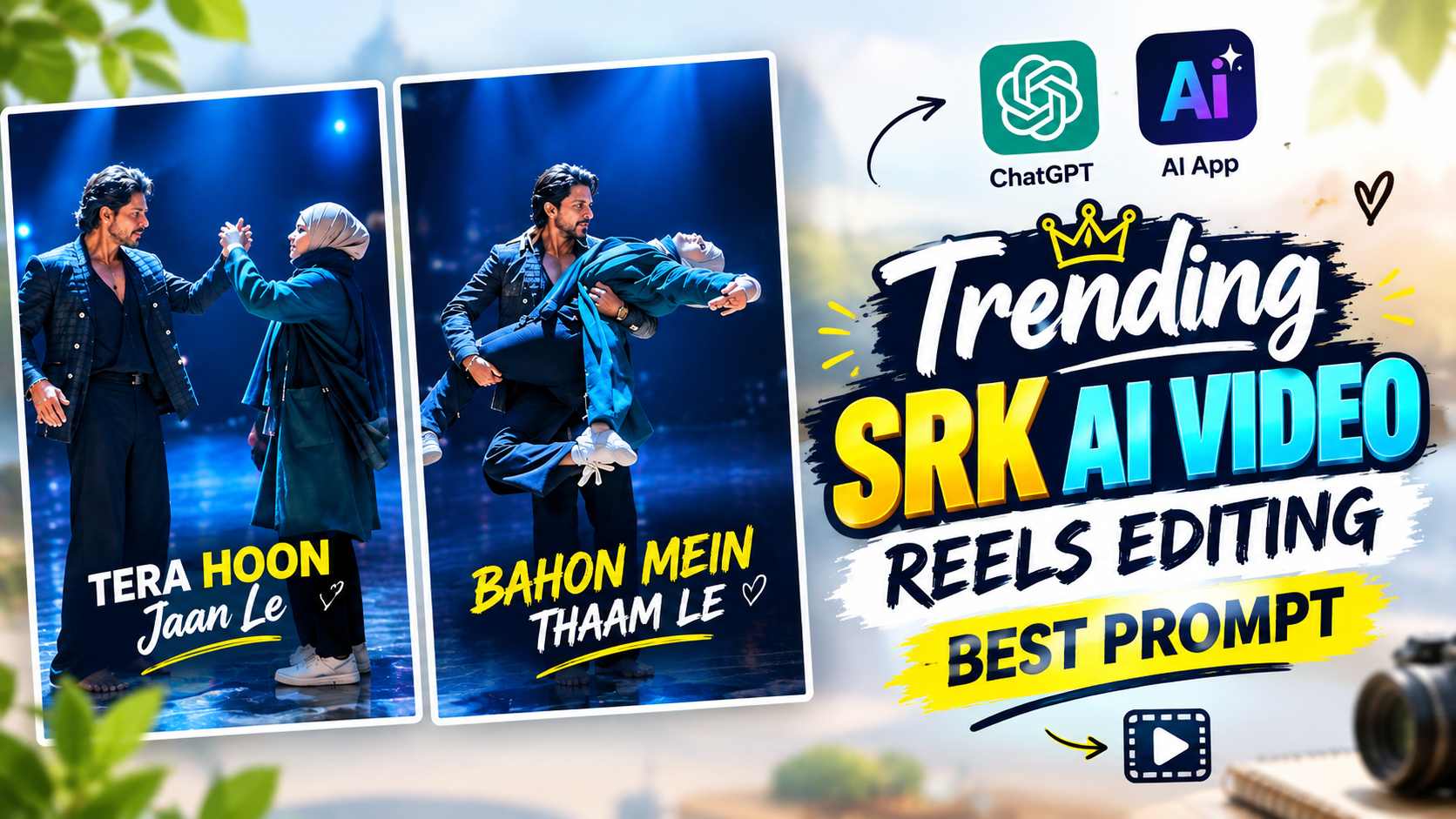
The SRK Dance AI video in question appears as a short vertical dance reel, depicting a male and female character dancing together on stage. The scene begins with the two characters facing each other, and then gradually changes to dance movements between them. The male character is seen wearing a dark or black outfit, while the female character wears a traditional dark-colored outfit and a scarf on her head. During the dance, the two perform various movements in coordination with each other. At times, slight hand movements are visible, while at others, the male character holds the female character’s hand and makes her turn. After this, both of them continue the dance sequence by moving back and forth and in the middle there is a noticeable pose where the male character lifts the female character and gives a dance-style pose. In the last part of the video, both of them again come face to face and complete the sequence. The background of the entire scene has been kept like a dark stage, while due to blue lighting from above, a cinematic stage-light effect is visible on the characters. Facial expressions and body coordination have also been maintained along with the dance movements, due to which the video feels like a planned performance. Because of this, it does not look like a normal AI video of just moving a photo, but looks like a proper dance sequence. Shah Rukh Khan’s presence in the video makes this trend more recognizable and that is why people are trying to make similar Reels by searching for it by the name of SRK Dance AI Video Prompt.
What’s Special About This SRK Dance Video?
The uniqueness of this AI dance video isn’t just that it transforms a photo into a dancing character, but its entire presentation is designed to resemble a short dance performance. Both characters interact with each other throughout the video, and their movements proceed in a sequence rather than appearing random. The initial face-to-face dance movement, followed by hand interaction, followed by a turning movement, and finally, a lift pose, create distinct visual moments in the video. These small actions make the video more engaging, as the viewer gets to see different movements throughout the 15-second sequence. The dark environment of the stage and the overhead blue light also make the appearance of this video quite distinct. The low-light background makes the characters more prominent, giving the dance performance a cinematic stage feel. The effort to match the movements and expressions to the rhythm of the song also helps make such AI videos more natural. The most interesting thing is that to achieve such results, the user doesn’t need to go on a stage and shoot the dance in person. A similar concept can be created with the help of a suitable reference photo and the right AI instructions. This photo-to-video transformation makes this trend interesting for users who want to use their ordinary photos in a unique and entertaining way.
SRK Dance Photo Prompt
Before creating such an AI dance video, it’s important to have a suitable reference image ready, as this image helps establish the character’s appearance during video generation. If you want your character to appear recognizable and natural in the final video, it’s best to take a photo in which the face is clearly visible, the image isn’t too blurry, and all the important parts of the subject are present in the frame. The photo prompts below can then be used in the AI tool you’re using. When generating or preparing photos, pay attention to maintaining the identity and natural appearance of your reference image, so that the character’s appearance is less likely to be unnecessarily altered during subsequent video creation. The purpose of this step is to first create a suitable visual reference, which will later be used for dance video generation.
SRK Dance Photo Prompt
Create SRK Dance AI Video Using Flow AI & Gemini
Once the photo is ready, the next step is to create a dance sequence using an AI video generation tool. AI tools like Gemini and Google Flow AI can be used for this, although the video generation capabilities and accessibility may not be the same on both platforms. Therefore, it’s important to check the features available in your account before using the tool. If your account has the image-to-video or video generation option, you can upload a prepared reference photo and use it with your video prompt. The video prompt plays a crucial role here, as it describes the dance movements, character interactions, camera movement, environment, expressions, and overall action. The more clearly the required movements are described, the better it will help the AI understand the desired sequence. Thus, the process can be broadly understood in two parts: first, creating a reference photo and then animating the same photo with the video prompt to create a dance video. If you’re using Flow AI, after uploading a photo, you can try creating a video based on your prompt by going to the video generation option provided. If the video generation feature is available on your account in Gemini, you can start the video generation process using a reference image in a similar way.
SRK dance video prompt here
How to create a video using Gemini and Flow AI
After using the video prompt above, you’ll need to generate a video using the reference photo and prompt in the AI tool. Using the image-to-video workflow in Google Flow AI, you can use the reference image as the scene’s starting point and attempt to generate character movement based on the prompt. In Gemini, the video creation option isn’t necessarily available across all accounts, so you should first check if the video generation feature is active on your account. If the option is available, you can upload a photo and generate a video based on the prompt. It is important to preview the entire video after it is created, as the AI-generated movements do not come out exactly the same in every generation. Sometimes the hand position, body movement, facial expression or interaction may not be exactly as per the prompt. In such a case, the prompt can be refined a bit and regenerated. Using a good quality clear reference photo and keeping instructions to preserve the character’s appearance can help in improving the overall result. After the final video is ready, check it in the vertical Reel format and see if the dance sequence, expressions, lighting and character appearance are close to your desired result. In this way, a complete SRK Dance AI Reel can be created by creating the starting image from the Photo Prompt and the movements from the Video Prompt.
Conclusion
This trend of turning photos into AI-generated dance videos is appealing to people because it offers the opportunity to create a creative short Reel without actually shooting the dance yourself. The SRK Dance AI video is an interesting example of this concept, featuring two characters in a stage-style romantic dance sequence to the song “Meri Zubaan Ho Tum Hi.” The video incorporates not just simple movements but also moments like hand interaction, turning, coordinated dance, and various poses, making the final result more engaging. The dark stage and blue lighting also give the entire scene a performance-based cinematic appearance. If you want to create a Reel like this, first create a clear and suitable reference photo. Then, try generating a dance sequence from the video prompt using that image in Gemini or Google Flow AI, using the AI video generation feature available in your account. The video generation feature in Gemini may vary by account or plan, so it’s best to check the available options first. On the other hand, the image-to-video process can also be followed according to the generation features available in Flow AI. The most important thing is to keep the original face and overall appearance natural when creating the final video, and to preview the entire video after generation. With the right reference image and properly written video instructions, you can try to recreate a similar AI dance concept for your Instagram Reel.